Designing an AI-Assisted Workflow for Project Insights
Jul - Aug 2025
Plane is a project management tool built for engineering and product teams who want more control and flexibility than what tools like Linear or Jira offer. It's open-source, self-hostable, and designed for teams that care about how their tools work under the hood.
Note: This work is under NDA, so keeping implementation details and internal metrics abstract. The focus here is on how I approached the problem, the decisions I made, and what I learned.
Industry
B2B, SaaS Product
What did I do?
Product design ownership for AI workflows including Chat, Canvas and Agents.
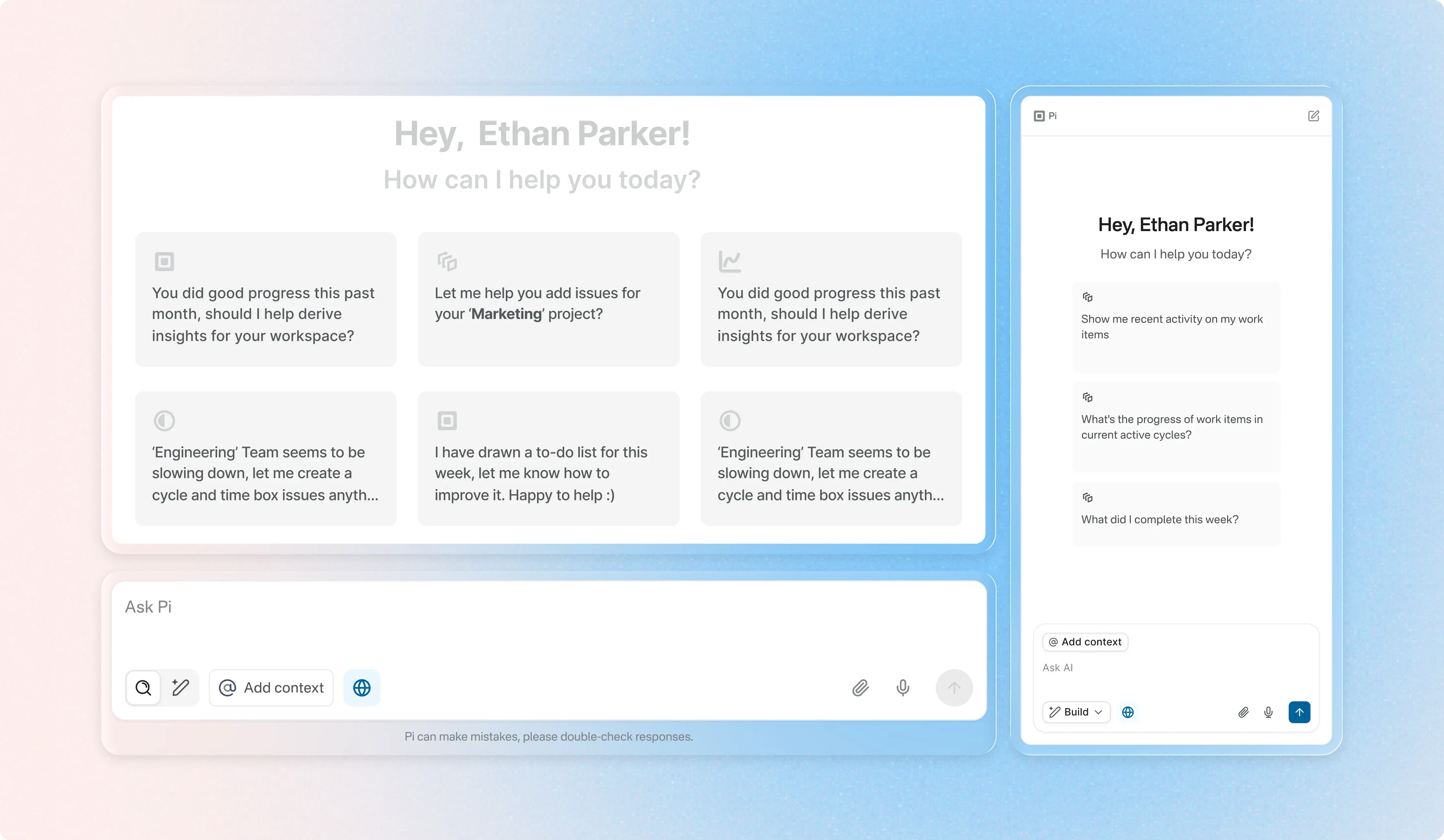
Prompt templates based on chats
To start with some context...
The initial brief came from the product team: “Enable users to ask questions about their workspace in plain language.” That was it — no specific use cases, success metrics, or guiding principles beyond “be helpful.” On the surface, it sounded straightforward: build an AI chat inside Plane. Users wanted more control over how they view their work. But the brief didn't say much about why they wanted this, which grouping options mattered most, or how this would fit into their actual workflows. It also didn't address how this would scale since Plane supports everything from small startups to teams managing thousands of issues.
Initial set of concerns
- What concrete workflows or frustrations are we solving?
- When do users struggle most with navigation or reporting?
- Are they organizing work for themselves, or for their team?
- How do we design for accuracy and safety?
- What happens when someone has 500 issues in a single project?
I reviewed support tickets and feature requests, talked to a few active users, and spent time in our own Plane workspace watching how the team used grouping day-to-day. A pattern emerged: people weren't just asking for more grouping options instead they were struggling with context switching and information overload.
Users would group by status to focus on what's in progress, then switch to assignee to check their own work, then switch to priority to triage. Each switch required reloading their mental model of the project. The tool was flexible, but it forced them to constantly reconfigure their view to get the information they needed. These questions helped pivot the brief from “add chat” to “augment insight discovery and reduce friction.”
Reframing the Problem
Rather than treating Plane AI as a generic chatbot, I reframed it as a design assistant for workspace context — a tool that helps users answer questions, analyze progress, and surface insights without deep dives into UI filters.
Key design questions I defined early on:
- What tasks do users really want to accomplish via AI?
- When does typing become easier than just filtering?
- How can responses reduce cognitive load instead of adding noise?
This shift moved the focus from:
Exploration & Iterations
I started by mapping out the different mental models users had when working with issues. Some people thought in terms of ownership (who's working on what), others in terms of workflow (what stage things are in), and others in terms of urgency (what needs attention now).
Version 1 — Simple Query Interface
We initially built a basic chat overlay where users could type questions and see responses. Early prototypes focused on handling simple queries like “show recent bugs” or “what tasks are overdue.”
Observation: Users expected actions after answers — not just text responses.
Version 2 — Contextual Interaction
Next iteration integrated context awareness:
- The AI recognised the active workspace or project.
- Results referenced issues with links back into the UI.
- Users could attach screenshots or docs for richer queries.
Even here, we slipped into overly verbose responses that didn't help users take action — a common early-version trap.
Version 3 — Task-Oriented Queries
We emphasized task outcomes in the conversational UI, e.g., “show me all high-priority issues blocking this cycle” turned into a structured list with links back into the workspace. At this stage, user feedback highlighted another tension: clarity vs. verbosity. We iterated on response design patterns — concise bullets with optional expanded explanations.
The Hard Parts (and Why They Mattered)/Where Things Got Interesting
1. Ambiguous Queries
Free-form natural language is inherently ambiguous. “Show overdue tasks” could mean different things depending on filters, projects, or views.
Solution:
We designed disambiguation prompts and offered filter suggestions to refine queries. If the AI wasn't confident, it asked clarifying questions before answering.
2. Balancing Accuracy and UX
There was a high chance of responses feeling helpful but being technically imprecise.
Solution:
We invested in previewing reasoning behind results, surfacing the logic—so users could understand why a certain set of issues matched their query. This transparency built trust and helped users refine their questions.
3. Designing for Read-Only at Launch
Originally, the read-only design (no automatic write capabilities) limited the assistant's usefulness.
Solution:
We focused instead on insight amplification. By steering users toward more actionable queries and linking results back to the core Plane UI, users still felt productive without the AI performing automated actions (which came later in the roadmap).
Outcome & Impact
Plane AI launched as a conversational assistant capable of:
- Searching issues and docs with plain language
- Summarising project states and risk areas
- Linking responses back into the workspace to reduce clicks
- Helping users uncover insights without complex filters or manual queries
Though quantitative metrics are internal, qualitatively users reported less frustration with navigating complex workspaces and a noticeable reduction in time spent on analysis tasks. More importantly, the design set expectations for future iterations, including action execution and iterative refinement of conversational flows.
Reflection
This project reinforced a few core lessons for me:
- Problem framing matters more than UI polish. A vague brief leads to vague outcomes — a strong problem definition changes the trajectory of design work.
- Design for trust in AI. Users are skeptical of wrong answers more than slow ones.
- Iterative feedback loops with real users are non-negotiable. Without early validation, we would have shipped patterns that felt clever but weren't useful.
If I could revisit this project, I'd explore adaptive prompts that tailor AI guidance based on user behaviour, not just language input — a next frontier for AI-assisted interfaces
Intrigued?
Let's connect to discuss more about the AI agents, workflows and what the final designs looked like.